Avatar Generator: Create Stunning AI Avatars from Photos Free
In today's digital-first world, your online presence matters more than ever. Whether you're building a personal brand on social media, creating content for YouTube, designing a professional LinkedIn profile, or simply want a unique avatar for gaming, the way you present yourself visually makes a lasting impression. But not everyone has access to professional photography or graphic design skills. That's where AI-powered avatar generation comes in, democratizing creative expression and making it possible for anyone to create stunning, stylized representations of themselves in seconds.
What Is Avatar Generator?
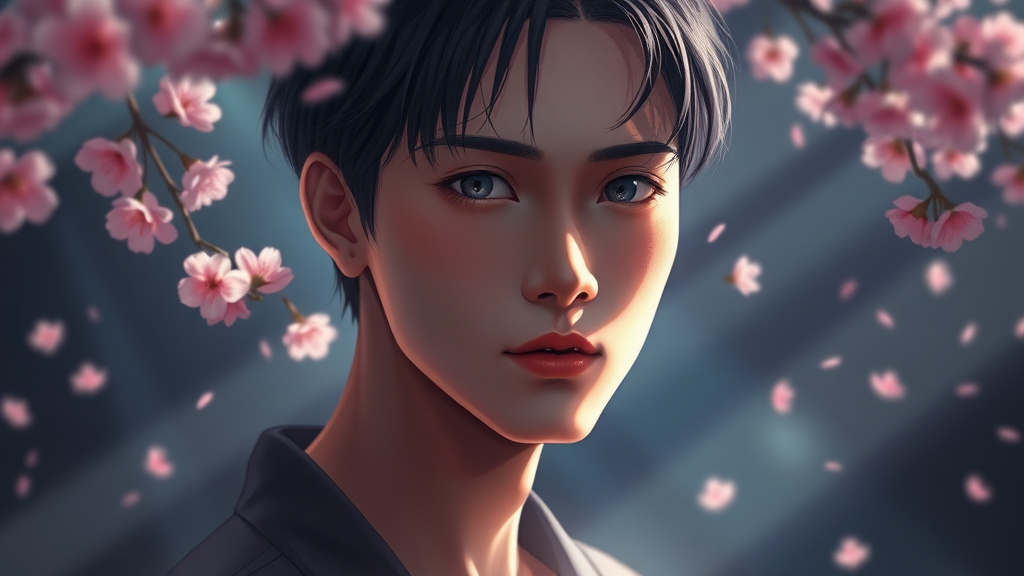
Avatar Generator is a powerful AI tool that transforms your ordinary photos into extraordinary stylized avatars across multiple artistic styles. Whether you want to see yourself as an anime character, a 3D cartoon figure, an oil painting masterpiece, or a vibrant pop art icon, this tool makes it possible with just a few clicks. Unlike traditional photo editing software that requires hours of learning and manual work, Avatar Generator uses advanced artificial intelligence to understand your facial features and recreate them in your chosen artistic style automatically.
Available as part of the comprehensive Luxoret.com platform, Avatar Generator joins over 200 creative AI tools designed to empower creators, marketers, students, and professionals. The tool is perfect for anyone who needs eye-catching profile pictures, unique social media content, creative marketing materials, or simply wants to explore different artistic interpretations of themselves. Best of all, you can Try Avatar Generator free on Luxoret without any design experience required.
What sets Avatar Generator apart is its combination of quality, speed, and variety. While some avatar tools limit you to one or two styles, this platform offers a diverse range of artistic interpretations—from the delicate lines of anime art to the bold colors of pop art, from the depth of oil paintings to the playful charm of 3D cartoons. Each style is powered by sophisticated AI models trained on thousands of artworks, ensuring your avatar captures both your likeness and the authentic aesthetic of your chosen art form.
Key Features
- Multiple Artistic Styles: Choose from anime, 3D cartoon, oil painting, pop art, and more artistic interpretations. Each style offers a distinct aesthetic, allowing you to match your avatar to your brand, mood, or platform requirements.
- AI-Powered Facial Recognition: Advanced algorithms analyze your photo to identify key facial features, expressions, and characteristics, ensuring your avatar maintains recognizable elements while transforming into your chosen style.
- High-Quality Output: Generate professional-grade avatars suitable for social media profiles, professional platforms, marketing materials, and print use. The AI produces crisp, detailed images that look polished and intentional.
- Fast Processing: Transform your photo into a stylized avatar in seconds, not hours. No waiting for designers or learning complex software—just upload and generate.
- User-Friendly Interface: Designed for everyone, regardless of technical skill level. The intuitive design means you can create stunning avatars even if you've never used design software before.
- Versatile Applications: Create avatars for social media profiles, gaming accounts, professional portfolios, YouTube channels, Discord servers, NFT projects, marketing campaigns, and more.
- Free Access: Available at no cost on Luxoret.com, making professional-quality avatar creation accessible to everyone, from students to small business owners to enterprise creators.
How to Use Avatar Generator: Step-by-Step
Best Use Cases
Social Media Branding: Content creators, influencers, and personal brands can use Avatar Generator to create distinctive, memorable profile pictures that stand out in crowded feeds. A stylized avatar helps build brand recognition—followers will instantly recognize your content when scrolling. The anime style works particularly well for gaming and entertainment creators, while pop art creates bold, attention-grabbing profiles perfect for lifestyle and fashion influencers.
Professional Networking: While LinkedIn typically favors traditional headshots, creative professionals like designers, artists, marketers, and developers can use stylized avatars to showcase their creative skills while maintaining professionalism. A well-executed 3D cartoon or oil painting avatar demonstrates both personality and an understanding of visual communication, helping you stand out to potential employers or clients in creative industries.
Gaming and Virtual Communities: Gamers, Discord users, and members of virtual communities need avatars that represent their online personas. Avatar Generator allows you to create unique identities for different gaming platforms, streaming channels, or community forums. The anime and 3D cartoon styles are particularly popular in gaming communities, offering a way to express personality without revealing your full identity.
Marketing and Advertising: Marketing teams can create consistent, stylized avatars for brand mascots, customer testimonials, team member profiles, or social media campaigns. Using Avatar Generator ensures visual consistency across materials while adding a creative, modern touch that resonates with digital-savvy audiences. Pop art styles work exceptionally well for bold marketing campaigns, while 3D cartoon styles create approachable, friendly brand representations.
Educational Content and Presentations: Teachers, tutors, and educational content creators can use avatars to create engaging, friendly representations for online courses, YouTube educational channels, or virtual classroom platforms. A stylized avatar feels more approachable than a formal photo while maintaining professionalism, helping students feel comfortable and engaged with the material.
Privacy-Conscious Professionals: For those who want to maintain an online presence without using their actual photograph—whether for privacy, safety, or personal preference—Avatar Generator offers a solution. You can create an avatar that captures your likeness artistically while providing a layer of privacy, perfect for consultants, coaches, writers, or anyone who needs a professional online identity without full photo exposure.
Pro Tips for Better Results
Choose the Right Source Photo: The quality of your avatar depends significantly on your input photo. Use a high-resolution image with good lighting, preferably taken in natural light or with professional lighting. Your face should be clearly visible, centered in the frame, and looking toward the camera. Avoid photos with heavy filters, extreme angles, or poor lighting, as these can confuse the AI and result in less accurate avatars.
Match Style to Platform and Purpose: Different artistic styles convey different messages. Anime styles suggest creativity and youthfulness, making them perfect for entertainment and gaming platforms. Oil painting styles convey sophistication and artistry, ideal for creative professionals and artists. 3D cartoon styles feel friendly and approachable, excellent for educators and community builders. Pop art makes bold statements, perfect for marketing and attention-grabbing campaigns. Choose your style based on where you'll use the avatar and what impression you want to make.
Experiment with Multiple Styles: Don't settle for the first avatar you create. Since the tool is free and fast, try generating versions in different styles to see which best captures your personality and serves your purpose. You might be surprised—a style you didn't initially consider might end up being your favorite. Keep multiple versions for different platforms and purposes.
Consider Background and Context: Think about where your avatar will appear. If it's for a profile picture that will be displayed as a small circle, ensure the focus is clearly on your face with minimal background distraction. For larger displays or header images, you might want more background elements. Some styles handle backgrounds differently, so factor this into your style selection.
Update Regularly for Freshness: While avatars don't need updating as frequently as photos, refreshing your avatar periodically keeps your online presence feeling current and engaged. Try new styles as they're added, or create seasonal variations. This is particularly valuable for content creators who want to keep their brand feeling fresh and dynamic without the expense of regular photoshoots.
Frequently Asked Questions
Is Avatar Generator free to use?
Yes, Avatar Generator is completely free to use on Luxoret.com. You can create as many avatars as you want, experiment with different styles, and download your results without any cost. Luxoret provides access to this tool along with over 200 other AI-powered creative tools as part of its mission to make professional-quality creative resources accessible to everyone.
What file formats does it support?
Avatar Generator accepts common image formats including JPG, JPEG, and PNG for uploads. These are the most widely used photo formats, covering images from smartphones, digital cameras, and most other sources. The generated avatars can be downloaded in high-quality formats suitable for both digital use and printing.
How long does it take to generate an avatar?
The generation process typically takes just a few seconds. After uploading your photo and selecting your preferred style, the AI processes your image almost instantly. This speed makes it easy to experiment with multiple styles and options until you find the perfect avatar for your needs.
Can I use the generated avatars commercially?
Yes, avatars created with Avatar Generator can be used for both personal and commercial purposes. This includes social media profiles, marketing materials, business websites, YouTube channels, merchandise, and other applications. You retain the rights to use your generated avatars as you see fit.
What makes a good source photo for avatar generation?
The best source photos are well-lit, high-resolution images where your face is clearly visible and centered. Natural lighting or professional lighting works best. Face the camera directly or at a slight angle, and avoid heavy filters, sunglasses, or obstructions that cover your face. A simple, uncluttered background helps the AI focus on your facial features for better results.
Can I create avatars for other people?
Yes, you can create avatars from any photo you have permission to use. This makes the tool valuable for teams creating consistent branded avatars, parents creating avatars for children, or businesses creating stylized representations of team members. Always ensure you have appropriate permissions for any photos you use.
Do I need design skills to use Avatar Generator?
Absolutely not. Avatar Generator is designed to be accessible to everyone, regardless of design experience or technical skills. The interface is intuitive—simply upload a photo, choose a style, and generate. The AI handles all the complex artistic transformation automatically, making professional-quality avatar creation accessible to complete beginners.
How is this different from photo filters?
While photo filters apply preset effects to your entire image, Avatar Generator uses advanced AI to understand your facial structure and recreate you in a completely different artistic style. The AI doesn't just overlay effects—it genuinely reimagines your appearance in anime, oil painting, pop art, or other styles, creating something new rather than just filtering what exists. The results are far more sophisticated and artistic than simple filters can achieve.
Start Creating with Avatar Generator Today
Your online identity deserves to be as unique and creative as you are. Whether you're building a personal brand, enhancing your professional presence, or simply exploring creative self-expression, Avatar Generator gives you the power to transform ordinary photos into extraordinary artistic avatars in seconds. With multiple styles, professional-quality results, and a completely free platform, there's never been a better time to reimagine your digital presence. Try Avatar Generator now — it's free and discover how AI can transform the way you present yourself online.